A self hosted LLM is an open-weight language model that runs on hardware you control: a desktop with a good graphics card, a server in your office, or a GPU you rent in the cloud. Searches for it grew almost twentyfold in a year, as more teams want AI that does not send every prompt to a large provider.
Self-hosting is one of three ways to run an open model. The other two are renting GPU time from a cloud, and sending requests to a network of independent operators who run the models for you. This guide covers what each one asks of you, and how to pick.
What self-hosting an LLM means
Open-weight models, such as Llama, Gemma, Qwen, Mistral and gpt-oss, publish their weights so anyone can download and run them. Self-hosting means doing exactly that on your own machine.
Most people start with one of a few tools:
Ollama, which pulls a model and serves it from the command line with one command.
LM Studio, a desktop app with a graphical interface.
vLLM, a serving engine built for many requests at once.
llama.cpp, a lightweight engine that also runs on CPUs and laptops.
Ollama, LM Studio and vLLM can all expose an endpoint in the same format as OpenAI's API, so most existing code can talk to a local model with small changes.
What hardware you need
The limit is almost always the memory on the graphics card (VRAM). The whole model has to fit in it, along with the conversation it is working on.
Small models, around 7 to 9 billion parameters, run on a single consumer GPU. Lightchain's own guide for workers asks for 8 GB of VRAM or more to serve Llama 3 8B.
Large models, around 70 billion parameters, need far more. The same guide asks for 40 GB or more for Llama 3 70B, which usually means a data-center card or several cards together.
Quantization, which stores the weights at lower precision, shrinks a model so it fits in less memory, with some loss in quality.
Speed depends on memory bandwidth as much as memory size, so two cards with the same VRAM can answer at very different speeds.
When self-hosting is the right call
Your data cannot leave your network. A local model never sends a prompt anywhere.
You need to work offline. A model on your own machine keeps working without a connection.
You have steady, heavy use. If a GPU is busy most of the day, owning it can cost less than paying per request.
You want to fine-tune. Training a model on your own data is easiest when you control the hardware.
Where self-hosting gets hard
Up-front cost. A card that runs large models is expensive, and it sits idle when nobody is using it.
Upkeep. Drivers, model updates, monitoring and restarts are now your job.
Bursts. One machine handles a set number of requests. A spike in traffic means queues or more hardware.
Model size. The biggest open models need multi-GPU setups that few teams want to run themselves.
The third option: a network of workers
A worker network keeps the open models and drops the hardware. Independent operators run the models on their own GPUs, and you pay for the answers you use.
On Lightchain AI, a layer-1 blockchain built to run AI, it works like this:
Workers stake LCAI and serve models from a list the network accepts, including Llama 3, Gemma, gpt-oss, Qwen, DeepSeek R1 and Mistral Small.
You pay one set fee per answer for each model, from 0.02 LCAI to 0.20 LCAI for chat models on the network's list of October 21, 2026 (subject to change). A long question costs the same as a short one, within each model's limits.
The Developer API, live on mainnet, accepts requests in the same format as OpenAI's chat API. Changing the base URL, the API key and the model name is enough for most apps.
Every answer is recorded as a job on the blockchain, with the worker that served it named.
There are trade-offs, and Lightchain's documentation lists them:
The API is text only. It has no images, tools or function calling, so agents that depend on tools need changes.
Settings such as temperature are accepted but have no effect, because each worker runs its model with its own configuration.
Your prompts are not only on your machine. Through the API, the API's operator can read prompts and answers. In Lightchain Chat, the conversation is encrypted under a key kept in your browser, and can be read by you, the worker serving it and the network's checking service.
Side by side
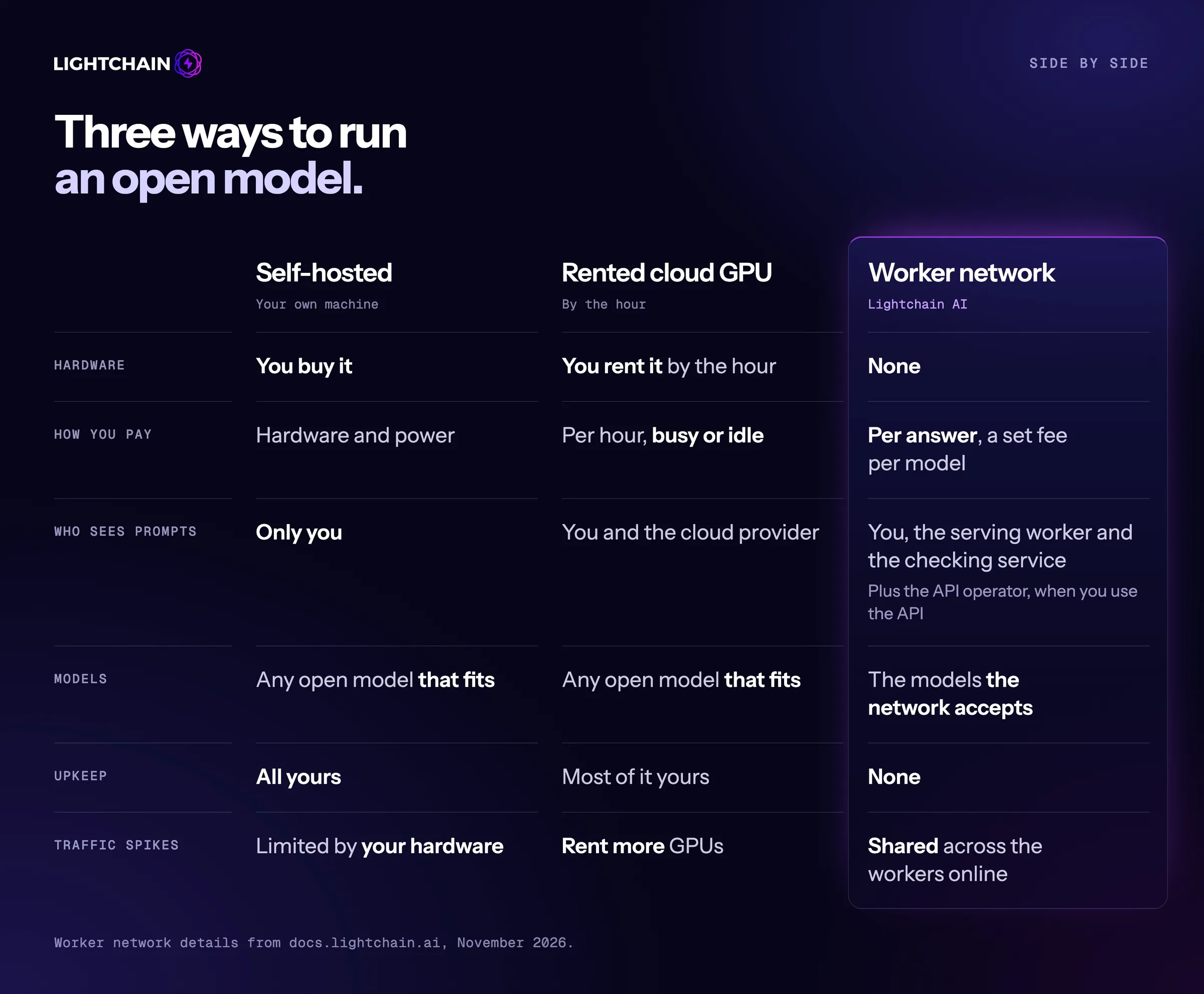
The first split between the three options is hardware and cost. Self-hosting means you buy the hardware and pay for the power, and the machine costs the same whether it is busy or idle. A rented cloud GPU removes the purchase, but you still pay by the hour, busy or idle. A worker network asks for no hardware at all: you pay a set fee per answer for each model, so you know the cost of a request before you send it.
Privacy runs the other way. A self-hosted model is the only option where nobody but you sees your prompts. On a rented GPU, the cloud provider can see them too. On a worker network, your prompts reach the worker that serves the answer and the network's checking service, and, when you use the Developer API, the API's operator as well.
The last trade is control against effort. Self-hosting and a rented GPU both run any open model that fits in the memory you have, while a worker network runs the models it accepts. In return, upkeep is all yours when you self-host, mostly yours on a rented GPU, and not your job at all on a worker network. Traffic spikes follow the same pattern: your own hardware sets a hard limit, a cloud lets you rent more GPUs, and a network spreads the load across the workers that are online.
How to decide
Choose self-hosting if prompts must stay on your hardware, you need offline use, or your GPU would be busy most of the day.
Choose a rented GPU if you need a model too large for your own machine and want full control of the setup.
Choose a worker network if you want open models without owning hardware, need a cost you can work out before each request, and your app works with text-only chat.
Many teams mix them: a local model for sensitive data, and a network or API for everything else.
Frequently asked questions
Is a self-hosted LLM free?
The software and most open models are free to download. The hardware, power and time to run them are not.
What is the best self-hosted LLM?
It depends on your hardware. Models around 8 billion parameters, such as Llama 3 8B or small Gemma models, run on one consumer GPU. Larger models such as gpt-oss 120B or Llama 3 70B need much more memory.
Can I use the OpenAI SDK with a self-hosted model?
Yes. Ollama, LM Studio and vLLM can serve an OpenAI-compatible endpoint, and so does Lightchain's Developer API.
Is a worker network as private as self-hosting?
No. Only a model on your own hardware keeps every prompt on your hardware. A worker network trades some of that privacy for not having to run the hardware.
Try it
The Developer API quickstart covers minting a key, funding a balance and making a first call. To start without spending real funds, use the test network and its free faucet.
This article is for informational purposes only and is not financial advice.

 Kleanthi